
Before You Buy
MSFS 2020 vs MSFS 2024 features

It is worth noting that there are some feature differences between the MSFS 2020 and 2024 versions as listed above. Most notably the cabin is not available in the 2020 version. This is due to the fact that the highly detailed cabin provided by iniBuilds is only possible due to the new LOD system introduced in MSFS 2024. Therefore there are no plans to bring a cabin to MSFS 2020. It is still possible to get wing views as iniBuilds has provided three window sections on each side of the aircraft.
Another noticeable difference is the lack of livery config in MSFS 2020. This means that changing settings on one airframe will change the settings for all of your liveries and you will have to adjust each setting everytime you change livery.
Finally LIDO charts are not available on the MSFS 2020 version. This is due to the fact that LIDO charts are included with 2024 and are not possible to be ported over into 2020. It is still possible to get charts on the OIS through a Navigraph subscription.
Performance
The performance impact of the iniBuilds A350 is high. iniBuilds claim that it should get similar performance to the Fenix A320, but user testing has concluded that it is worse (think half way between the FBW A380 and the Fenix A320).
iniBuilds have provided options to improve performance on your system. Firstly, there is an option to download lower resolution textures. It is strongly recommended you do this as there is a noticeable increase in performance and very little difference in the quality of textures. This can be done through the iniManager as shown.
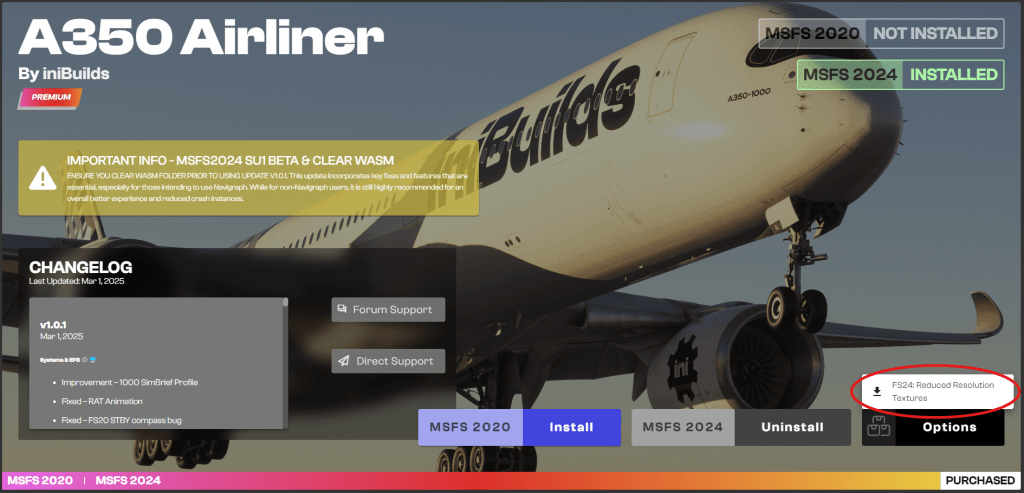
iniBuilds have also provided a no cabin version. It is recommended to use this if you are having issues with stutters. There is also a ‘performance mode’ in the OIS which can be enabled (FLT OPS MENU -> OPTIONS -> SIMULATION -> PERFORMANCE MODE). This will remove parts of the aircraft you are not looking at to improve performance. You will only notice this when moving quickly between camera views as it may take a small amount of time to load the part of the aircraft you have moved to.
Finally, I personally recommend the use of AutoFPS. More information can be found here.
Missing features
The A350, due to simulator limitations, is missing a few features of the real aircraft. This list is accurate as of launch of the A350 and may need to be updated over time.
- No taxi camera
- No use of dual jetways
- Window wipers are inoperative
 Flight Sim Tutor