
AutoFPS by ResetXPDR
AutoFPS is a tool designed to automatically update your LOD settings in Microsoft Flight Simulator. It is compatible with both MSFS 2020 and MSFS 2024. We will go through my recommended settings on this page.
Caution: it is worth noting that Microsoft view this app as modifying licenced data. As such any mention of it on the official MSFS forums will be removed.
Installation
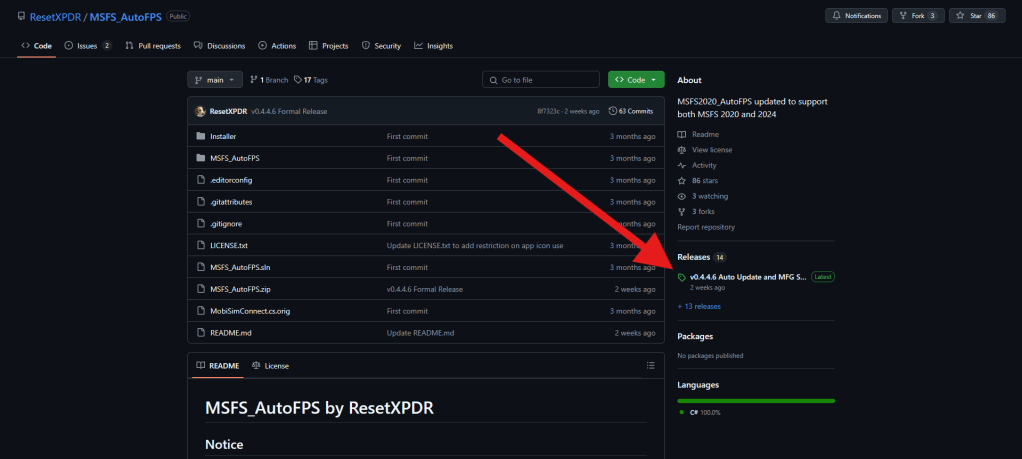
To download AutoFPS go to this GitHub page. Click on the latest release under ‘Releases’
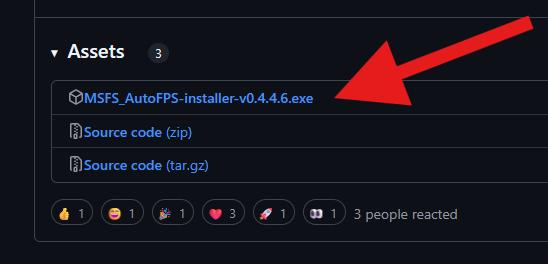
Now scroll to the bottom and click on ‘MSFS_AutoFPS-installer-v0.4.4.6.exe’ or equivalent version number.
Next, go through the installation. Do not run the installer as admin unless it will not install due to a permissions issue. If you get a Windows Defender popup; click ‘More info’ then ‘Run Anyway’. Once you are in the AutoFPS installer, install with the following settings:
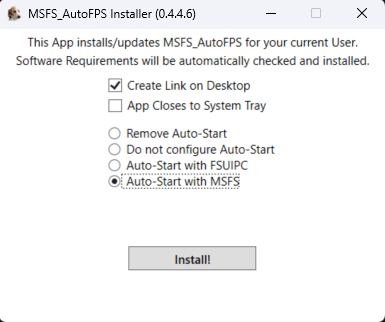
The application will now install the required software (.NET 7 Desktop Runtime (x64) and MobiFlight Event/WASM Module) and AutoFPS.
Recommended Settings
Credit goes to LondonController for the following settings:

If your FPS is still too low on the ground adjust the TLOD Base to a lower value. If you want better detail on the ground, raise the TLOD Base.
Similarly, if your FPS goes too low in the air, lower the TLOD Top or raise it for better ground detail.
 Flight Sim Tutor